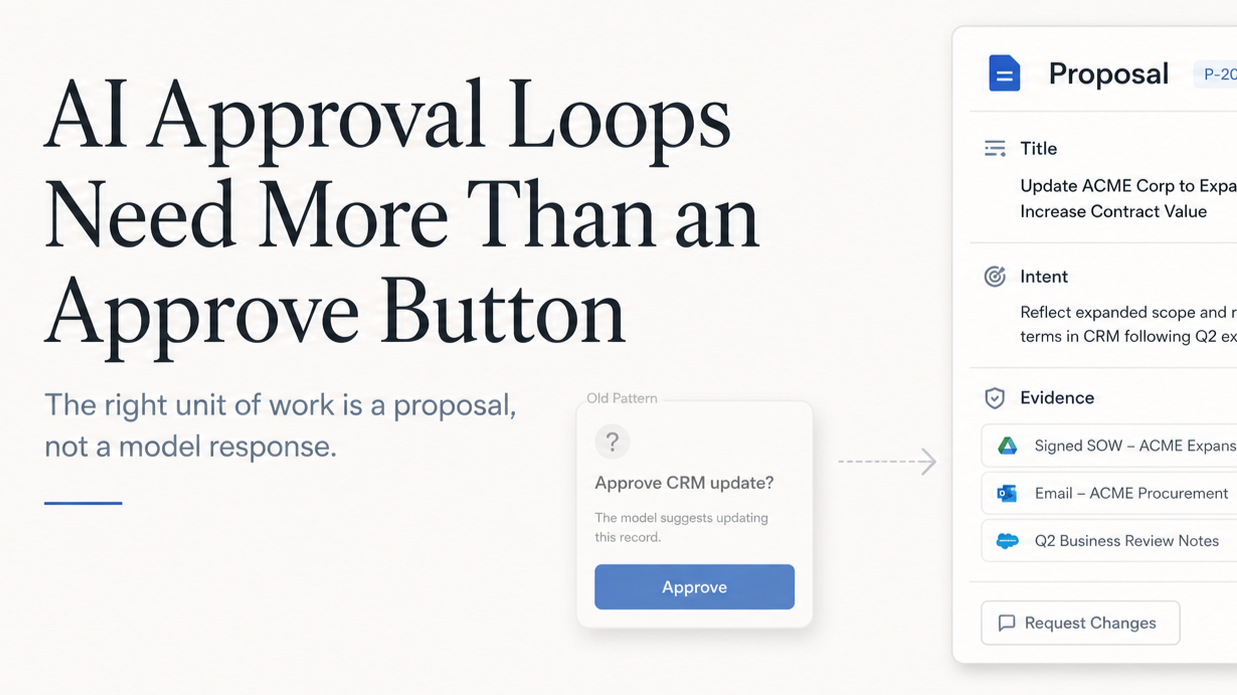
The problem with AI approval flows is not that humans are removed from the loop. It is that the loop often asks the human the wrong question.
Most approval flows ask, "Should we do this?"
But for AI-generated work, the better question is, "What exactly am I being asked to approve?"
That distinction matters because bad AI output inside a company often does not look obviously bad. It looks reasonable. It uses the right vocabulary, follows the expected format, and sounds like something a competent person might have written. The mistake is usually hidden one layer down: an old source, a draft policy treated as final, a missing customer note, a subtle assumption that changes the recommendation.
That is the dangerous middle ground for business AI. The output is not broken enough to reject at a glance, but it is not grounded enough to trust.
The bad pattern
The default answer is to add an approval button. Let the AI draft the reply, update the CRM, classify the expense, or recommend the access change, then ask a human to approve it. This feels safe, but often becomes a thin confirmation layer. The AI produces something polished, the human skims it, and the product records that a review happened.
The review did not really happen. The human approved the presentation of the work, not the work itself.
The better pattern
A better pattern is to make the AI produce a proposal before it changes business state.
A proposal is not just an AI output with a button under it. It is a structured object that explains the intended change, the reason for it, the evidence behind it, the affected systems, and the risks. It gives the reviewer enough context to make a decision instead of asking them to judge whether the AI "seems right."
Approval Is Usually Too Vague
Most approval flows are designed around the final action.
- Approve CRM update.
- Send drafted response.
- Apply suggested fix.
- Approve expense review.
Those prompts are technically accurate, but they hide the judgment that matters. The hard part of business work is rarely the action itself. Updating a field, sending an email, creating a task, or routing an exception is easy. The hard part is knowing whether the action is appropriate.
Which source is authoritative? Is this customer-facing or internal? Is the AI applying a policy, following a preference, or guessing? Did the underlying data change after the AI reviewed it? Would approving this create downstream work for another team?
If the approval step does not expose that context, the human is not reviewing the AI's reasoning. They are reviewing the AI's confidence, or worse, the fluency of its writing.
That is not enough for workflows that affect customers, employees, revenue, permissions, financial records, or official decisions.
Treat AI Output Like a Transaction Draft
The pattern I have found most useful is to treat AI output like a transaction draft.
The AI should not directly perform the business action, and it should not simply generate a block of text for someone to interpret. It should create a structured proposal that can be reviewed, edited, validated, applied, and logged.
Imagine a sales ops assistant reviews a call transcript and CRM history. If it detects renewal risk, it should not silently update the opportunity. It should produce something like this:
{
  "title": "Update Acme renewal risk",
  "intent": "Reflect implementation concerns from the latest customer call",
  "evidence": [
    {
      "source": "May 1 call transcript",
      "summary": "Customer raised onboarding delays"
    },
    {
      "source": "Implementation ticket #4821",
      "summary": "Open blocker assigned to onboarding team"
    },
    {
      "source": "CRM opportunity",
      "summary": "Renewal date is June 30"
    }
  ],
  "proposedActions": [
    {
      "type": "updateRenewalRisk",
      "accountId": "acme",
      "from": "low",
      "to": "medium"
    },
    {
      "type": "createFollowUpTask",
      "owner": "CSM",
      "title": "Escalate Acme onboarding blockers"
    }
  ],
  "risks": [
    "Forecast category is unchanged",
    "No customer-facing message will be sent",
    "Risk level should be refreshed if the implementation ticket changes"
  ]
}
Now the reviewer is not approving a vague AI recommendation. They are approving a specific set of changes with evidence and scope attached.
That is the real approval loop: gather context, draft a proposal, validate it against business rules, let the human review or edit it, check whether the source data is stale, apply only the approved actions, and log what happened.
This is less exciting than a fully autonomous agent. It is also much closer to how real companies need software to behave.
Design the Tool Surface Around Business Actions
One reason AI approval flows become vague is that the underlying tools are vague.
A lot of systems expose generic actions like updateRecord, patchObject, sendEmail, createTask. These are useful from an engineering perspective, but too broad from a product perspective. They allow the AI to do something technically valid while being operationally wrong.
The tool surface should use business verbs instead.
- Use
requestRefund, notupdatePayment. - Use
draftCustomerReply, notsendEmail. - Use
updateForecastNote, notpatchOpportunity. - Use
createProposal, notcreateTask.
The difference is not just naming. A business verb constrains the shape of the action. A refund request can require an amount, a policy reason, a source transaction, and an approval threshold. A customer reply can separate external text from internal notes. An access grant can require a permission scope, expiration date, and approver.
The tool surface is part of the product design. It teaches the AI what kind of work it is allowed to propose, and it teaches the reviewer what kind of decision they are being asked to make.
Make the Review About the Parts That Matter
A strong approval flow should expose the things a human can actually inspect.
First, show the evidence. A support reply should show the policy article it cites. A forecast update should show the customer signal that triggered it. An invoice exception should show the rule it matched and the missing field. The goal is not to dump every source into the UI. The goal is to make it easy to catch the most common failure mode: the AI was looking at the wrong thing.
Second, separate internal and external output. A single proposal might include a customer-facing email, an internal note, a task for another team, and a status change. Those should not all have the same review path. Customer-facing text needs a different bar than internal routing metadata. Legal claims need a different bar than task titles. Manager-only notes should not accidentally become visible to a customer.
Third, check for stale data before applying. Every proposal should know what version of the world it was based on. If the AI drafted an account update at 9:00 and the account owner changed the opportunity at 9:05, the proposal may no longer be safe to approve at 9:10. Store affected record IDs, source timestamps, revisions, proposal creation time, requester, and workflow name. If the underlying records changed, mark the proposal stale and refresh it.
Finally, approval should not be binary. In real work, the right answer is often "mostly yes, but change this part." Approve the CRM update, but rewrite the note. Send the support reply, but remove the roadmap promise. Approve three expense items, but route one to finance. If the only options are approve and reject, users will either rubber-stamp imperfect work or stop using the system.
The best approval flows let the human finish the transaction.
A More Useful Skill Pattern
Here is the version I would actually give an internal AI assistant or use as the basis for a product spec.
# Skill: Create a Business Approval Proposal

Use this skill when an AI-generated output could change business state, affect a customer or employee, create financial impact, modify permissions, or become part of an official record.

Do not perform the action directly. Create a proposal for review.

## Proposal Contract

Return a structured proposal with these fields:

1. `title`
A short description of the proposed change.

2. `intent`
Why this change should happen now.

3. `evidence`
The specific sources used to justify the proposal. Include source name, timestamp or revision when available, and a short summary of what the source supports.

4. `proposedActions`
A list of typed business actions. Do not use generic actions like `updateRecord`, `patchObject`, or `sendEmail`.
Each action should include:
- action type
- target record or system
- current value, if applicable
- proposed value
- reason
- visibility
- whether it affects a customer, employee, financial record, permission, or official system of record

5. `risks`
What could be wrong, stale, unsupported, sensitive, or incomplete.

6. `stalenessCheck`
The records, timestamps, or revisions that must be checked again before applying the proposal.

7. `reviewOptions`
The reviewer must be able to approve, reject, edit, regenerate, or approve only selected actions.

8. `auditLog`
What should be recorded after approval, including the original proposal, reviewer edits, approver, timestamp, final actions applied, and any skipped actions.

## Rules

- Separate external communication from internal notes.
- Flag unsupported claims.
- Flag policy thresholds that require higher approval.
- Never apply actions that were not explicitly approved.
- If source records changed after the proposal was created, mark the proposal stale and ask for a refresh.
- If confidence is low, explain what evidence is missing instead of pretending the proposal is ready.
This is the core product pattern: the unit of work in business AI should not be the model response. It should be the proposal.
A model response is easy to generate and hard to govern. A proposal is specific enough to review, structured enough to validate, and durable enough to audit later.
That is how AI moves from impressive demo to operational software.